
Starlink Mini: The Ultimate Portable Satellite Internet Solution for Travelers and Remote Users

Introduction
Reliable internet is no longer a luxury—it has become essential for work, education, communication, and entertainment. Unfortunately, many remote locations still struggle with slow or unavailable internet services. That’s where Starlink Mini offers a practical solution.
Designed to deliver fast satellite internet in a compact and portable package, this device allows users to stay connected almost anywhere with a clear view of the sky. Whether you’re a digital nomad, camper, RV owner, emergency responder, or someone living in a rural area, this portable satellite system brings dependable internet without relying on traditional infrastructure.
What Is Starlink Mini?
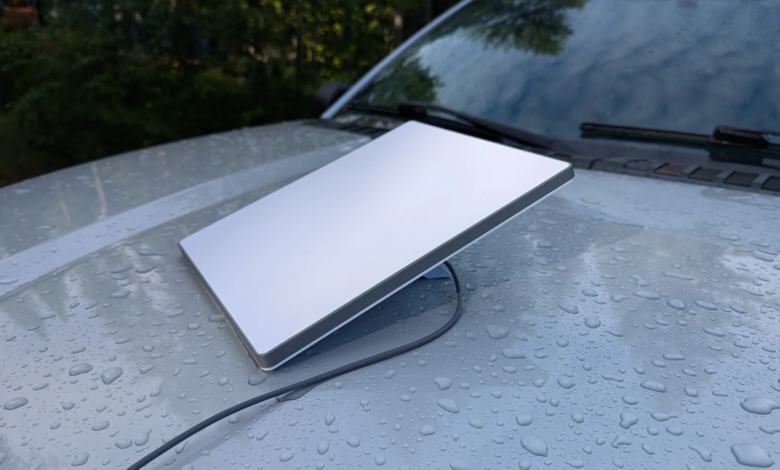
Starlink Mini is a compact satellite internet terminal developed by SpaceX as part of the Starlink satellite network. Unlike the standard residential kit, this smaller version focuses on portability while still providing high-speed internet access.
Its lightweight design allows users to carry it easily during travel, making it ideal for people who frequently move between locations.
The system communicates directly with low-Earth orbit satellites, reducing latency and providing faster internet than traditional satellite providers.
Key Features
Compact and Lightweight Design
One of the biggest advantages is portability. The device is significantly smaller than the standard Starlink dish, making it easy to fit into backpacks, RV storage compartments, or travel bags.
Built-in Wi-Fi Router
Instead of carrying separate networking equipment, users benefit from an integrated Wi-Fi router that supports multiple connected devices.
Fast Internet Speeds
Although actual performance depends on location and network conditions, users generally experience speeds suitable for:
- Video streaming
- Video conferencing
- Remote work
- Online learning
- Web browsing
- Cloud applications
Easy Setup
The installation process is simple. Users only need to:
- Place the terminal in an open area.
- Connect the power source.
- Open the Starlink mobile app.
- Wait for satellite alignment.
- Connect devices to Wi-Fi.
No professional installation is required.
Portable Power Compatibility
Many travelers power the device using portable batteries, vehicle power systems, or solar energy setups, making it perfect for off-grid adventures.
Who Should Buy It?
Digital Nomads
Remote professionals often struggle with unreliable hotel or campground Wi-Fi. This portable internet solution provides consistent connectivity from almost any location.
RV Travelers
People traveling across countries can maintain internet access without depending on local providers.
Campers and Outdoor Enthusiasts
Camping no longer means being completely disconnected. Whether checking maps, weather updates, or staying in touch with family, reliable internet adds convenience.
Rural Homeowners
Many rural communities still lack fiber or cable internet. Satellite connectivity helps bridge that gap.
Emergency Response Teams
Reliable communication is critical during natural disasters and emergency situations where traditional networks fail.
Performance and Speed
Internet performance varies depending on:
- Satellite visibility
- Weather conditions
- Local congestion
- Geographic location
Typical activities supported include:
- HD video streaming
- Online meetings
- Voice calls
- File downloads
- Social media
- Smart home connectivity
Latency is much lower than traditional geostationary satellite internet because Starlink satellites orbit much closer to Earth.
Advantages
Internet Almost Anywhere
The biggest benefit is internet access in locations where fiber, DSL, or cable services don’t exist.
Quick Deployment
Unlike wired internet installations that may take days or weeks, setup typically takes only a few minutes.
Portable Convenience
Its small size makes transportation simple, especially for travelers.
Reliable Backup Connection
Businesses and homeowners can also use it as a backup internet option during outages.
Supports Multiple Devices
Families or work teams can connect several smartphones, laptops, tablets, and smart devices simultaneously.
Things to Consider Before Buying
Initial Equipment Cost
The hardware requires an upfront investment that may be higher than conventional internet equipment.
Monthly Subscription
Users must maintain an active service plan to access the satellite network.
Clear Sky Required
Trees, buildings, mountains, and other obstructions can affect signal quality.
Weather Effects
Heavy storms, snow, or dense cloud cover may temporarily reduce performance, although service generally remains stable.
Power Requirements
Unlike mobile hotspots, the system requires a reliable power source.
Setup Guide
Step 1: Download the Starlink App
Install the official application before using the device.
Step 2: Find an Open Location
Place the terminal where it has an unobstructed view of the sky.
Step 3: Connect Power
Power the unit using its compatible adapter or supported portable power source.
Step 4: Wait for Satellite Connection
The terminal automatically aligns itself with available satellites.
Step 5: Connect Your Devices
Join the Wi-Fi network and begin browsing.
The entire process usually takes only a few minutes.
Best Use Cases
This portable satellite system performs particularly well for:
- Road trips
- Remote cabins
- Construction sites
- Outdoor events
- Field research
- Marine travel (where supported)
- Disaster recovery
- Rural businesses
- Temporary job locations
Its flexibility makes it suitable for both recreational and professional applications.
Comparison with Traditional Internet
| Feature | Starlink Mini | Fiber Internet | Mobile Hotspot |
|---|---|---|---|
| Portable | Yes | No | Yes |
| High Speed | Yes | Yes | Varies |
| Rural Coverage | Excellent | Limited | Moderate |
| Setup Time | Minutes | Days | Minutes |
| Infrastructure Required | No | Yes | Cellular Towers |
| Travel Friendly | Excellent | No | Good |
For users constantly changing locations, portability becomes a major advantage over fixed internet services.
Tips to Get Better Performance
Keep the Sky Clear
Avoid placing the device under trees or near tall buildings.
Update Software
Firmware updates improve stability and performance.
Use Quality Power Sources
Stable power helps prevent unexpected interruptions.
Monitor Obstructions
Use the mobile app to identify objects blocking satellite visibility.
Secure the Device
Wind or accidental movement can affect positioning, so place it on a stable surface.
Is It Worth Buying?
For users who frequently travel or live in areas with poor internet infrastructure, the answer is often yes.
The portability, simple setup, and impressive satellite coverage provide flexibility that traditional internet providers cannot match.
However, users with reliable fiber internet at home may not benefit as much unless they need a backup connection or travel regularly.
Ultimately, the value depends on your lifestyle and connectivity needs.
Frequently Asked Questions (FAQs)
1. Is Starlink Mini good for remote work?
Yes. It supports video calls, cloud applications, file sharing, and other remote work tasks in areas with satellite coverage.
2. Can I use Starlink Mini while traveling?
Yes. It is specifically designed for portability, making it suitable for road trips, RV travel, camping, and temporary locations.
3. Does weather affect Starlink Mini?
Heavy rain, snow, or severe storms can reduce signal quality temporarily, but normal weather generally has minimal impact.
4. How long does setup take?
Most users complete setup within 5–15 minutes after finding a location with a clear view of the sky.
5. Is Starlink Mini better than a mobile hotspot?
In remote areas with weak cellular coverage, it often provides more reliable internet because it connects directly to satellites rather than mobile towers.
Conclusion
Portable internet has transformed the way people work, travel, and stay connected. Starlink Mini combines fast satellite connectivity with a compact design that fits the needs of modern users who require internet beyond city limits. Its simple setup, reliable performance, and wide coverage make it an excellent choice for travelers, remote workers, rural residents, and emergency responders. Although it requires an upfront investment and an active subscription, the freedom to access dependable internet from remote locations makes it a worthwhile solution for anyone who values mobility and consistent online access.
